
Pay a supplier invoice
Pay a supplier invoice directly from your Trade Account. Shift pays your supplier upfront and you repay on terms that suit your business.
Before you start, make sure you have:
- Your supplier’s ABN, business name or trading name
- Your supplier’s bank details
- A copy of the supplier invoice.
Read more
Log in to your Trade Account.
From your dashboard, click Pay a supplier. Choose an existing supplier or add a new one.
To add a new supplier, search by ABN, business name or trading name. Select the correct supplier and enter their bank details.
Enter the invoice details and upload a copy of the invoice.
Schedule a date for Shift to pay your supplier.
Choose your repayment option: Pay in full (one repayment on your chosen date) or Pay in instalments (repay over up to 20 weeks).
Click Update to confirm payment to your supplier.
Optional: send a remittance to your supplier. Tick the box if you’d also like a copy, then click Send.
Note: Payments typically take 1–3 business days to reach your supplier, depending on their banking institution.
Approve a supplier invoice
When your supplier uploads an invoice in Shift Trade, you will receive an SMS asking you to review and approve the transaction.
Read more
Log in to your Trade Account.
From your dashboard, scroll to the Invoices section and click the Pending invoices tab
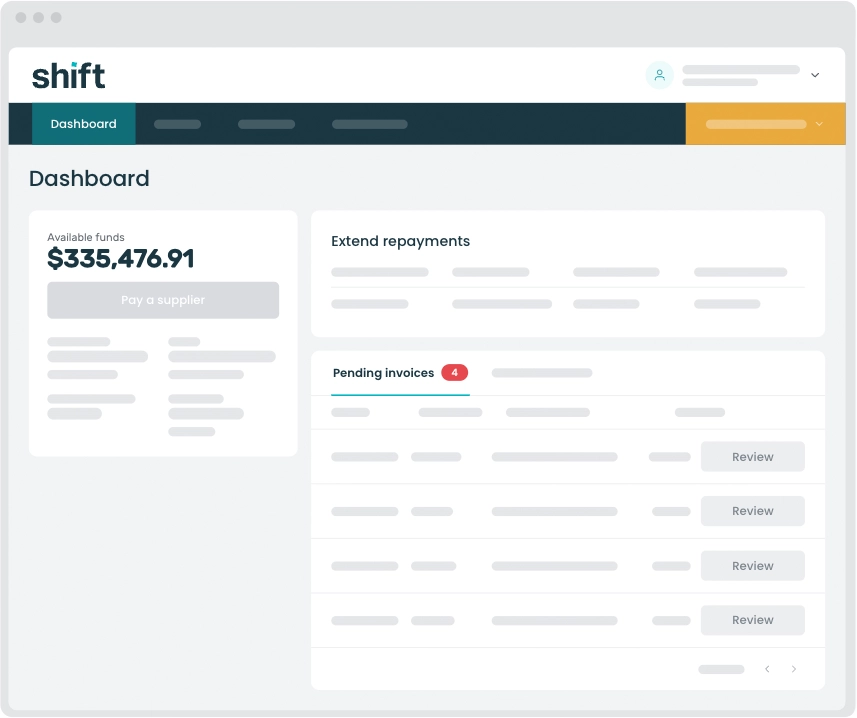
Find the invoice you want to approve, then click Review.
Check the supplier and invoice details to confirm everything is correct.
Select Repay in full to accept the terms offered by your supplier.
Click Pay invoice to confirm payment.
How long does it take for my supplier to receive payment?
In most cases, invoices are processed the same day. Depending on who your supplier banks with, it may take up to three business days for the payment to appear in your supplier’s bank account.
Can I get a copy of a payment remittance?
Yes. If you missed the option to request a remittance when making a payment, call us on 1300 249 649 and our team will send you a copy.
How do I cancel an invoice payment?
Call us on 1300 249 649. Our team will work with you to correct any errors.
Need assistance?
Our friendly team is here to assist you. Please contact us on 1300 249 649 from Monday to Friday (8:00am – 7:00pm AET) and Saturday (9:00am – 2:00pm AET) or email trade@shift.com.au.