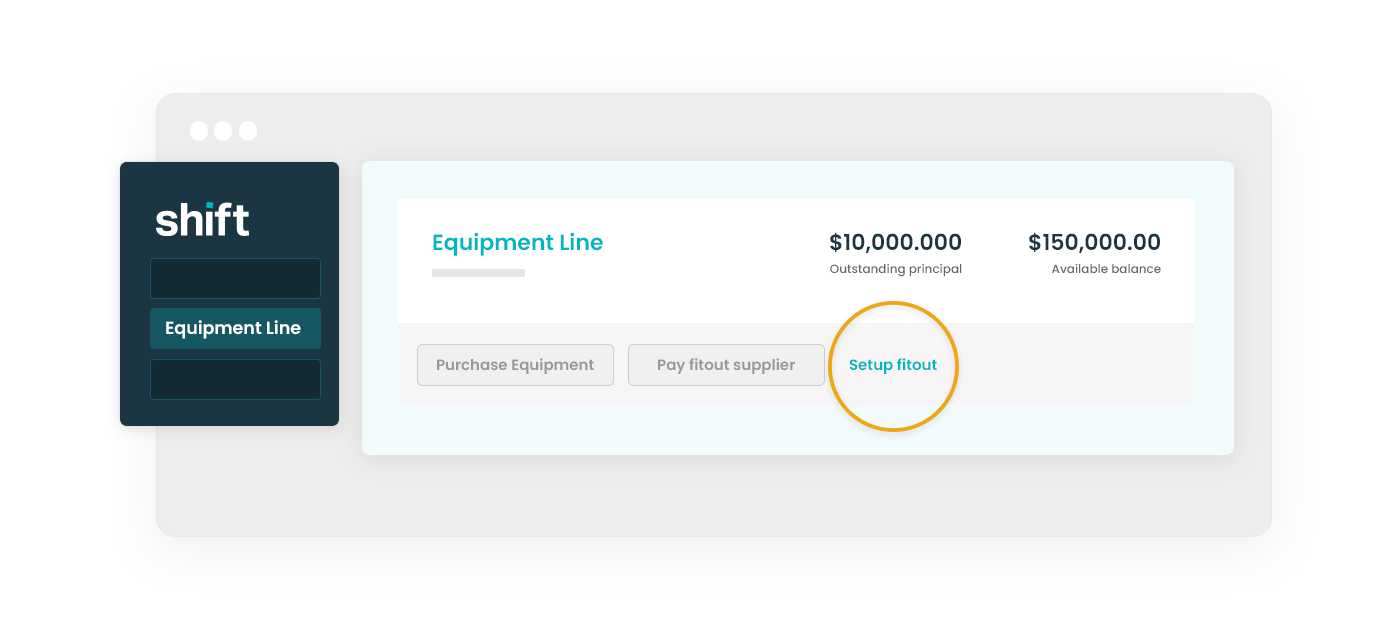
Select your Equipment Line facility, then click Set up fitout.
Step 3
Enter your fitout address and an approximate budget. Include allowances for interest and fees associated with your transaction, then click Continue.
Step 4
Review your fitout agreement, then click Accept & continue.
Pay a fitout invoice
Pay invoices linked to an existing fitout. Repayments are deferred for 120 days from the fitout creation date.
Step 5
Select your Equipment Line facility, then click Pay fitout supplier.
Step 6
Select the address linked to your fitout and click Continue. If the address isn’t available, you’ll need to set up a fitout first.
Step 7
Enter your supplier and invoice details. The amount must match the invoice.
Step 8
Upload a copy of the invoice. Check that it includes:
Your entity name, trading name, or director name
Your supplier’s ABN, payment details, contact information and amount due.
Step 9
Review your purchase agreement, then click Accept & pay invoice.
Need assistance?
Our friendly team is here to assist you. Please contact us on 1300 249 649 from Monday to Friday (8:00am - 7:00pm AET) and Saturday (9:00am - 2:00pm AET) or email contact@shift.com.au.